

Latest Version
Christopher Bess
IT Tools
Mac
Free
1157225201
Report a Problem
More About Text Toolset
The Developer's Editing Bottleneck
Picture this: you are deep in an intense coding session inside Xcode, refactoring a complex Swift class. Suddenly, you need to clean up a messy JSON payload, comment out a massive block of legacy code, or insert multiple cursors across several lines to rename localized variables. Stopping your workflow to manually edit line by line—or worse, pasting your code into an external web tool—breaks your focus and introduces unnecessary friction. This is where the Text Toolset Xcode editor extension steps in to streamline your development pipeline.
Created by developer Christopher Bess, this lightweight Mac utility integrates directly into your native development environment, offering a suite of targeted text manipulation commands that feel like native Xcode features.
Key Features of the Text Toolset Xcode Editor Extension
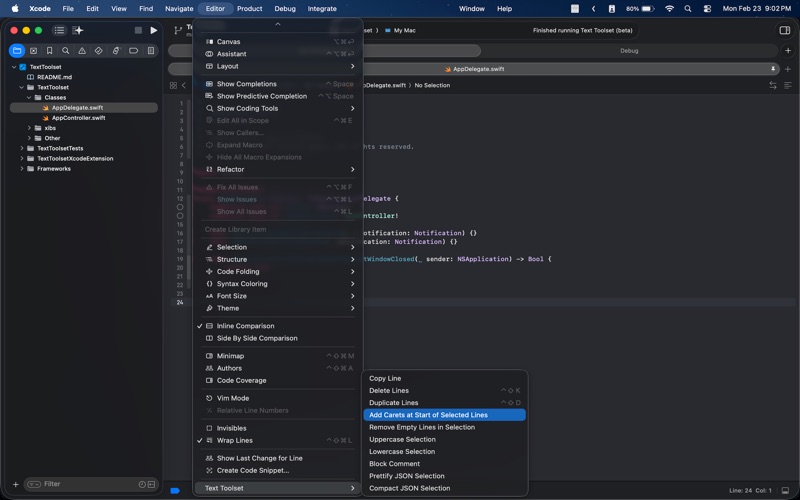
The Text Toolset Xcode editor extension is designed to perform specific, high-frequency editing tasks with minimal fuss. Instead of bloated features, it delivers highly focused utilities:
- Multi-Line Carets: Instantly place a cursor at the start of every selected line to edit multiple lines simultaneously.
- Block Comment Toggling: Quickly wrap or unwrap your active selection with classic
/* ... */block comment tags. - Effortless Line Manipulation: Copy, duplicate, or delete entire lines instantly without needing to highlight them first.
- JSON Formatting: Prettify raw, unformatted JSON with clean indentation, or compact it into a single line by stripping out unnecessary whitespace.
- Clean-Up Tools: Strip empty lines from your selection and toggle between uppercase and lowercase configurations in a single click.
How to Integrate It Into Your Xcode Workflow
Setting up the Text Toolset Xcode editor extension is straightforward. After obtaining the application, you simply enable it via your Mac's System Settings under the Extensions menu for the Xcode Source Editor. Once activated, the utility is accessible directly inside Xcode under the Editor menu.
To maximize your efficiency, you can bind these functions to custom keyboard shortcuts (such as assigning Cmd+Ctrl+/ to toggle block comments or Ctrl+Shift+D to duplicate lines) via the Key Bindings panel in Xcode's settings.
Who Is This Tool For?
This extension is built specifically for macOS developers working with Xcode 15 or later. Whether you are writing Swift, Objective-C, C++, or editing plain text configuration files, it eliminates repetitive keystrokes. It is an ideal addition to the toolkit of any developer looking to optimize their daily coding speed without leaving their IDE.
Get Started with Text Toolset
If you want to eliminate tedious formatting tasks and keep your hands on the keyboard, this utility is a highly effective, lightweight solution. To try it out for yourself, head over to the official Mac App Store to explore the extension and integrate it into your development environment.
Rate the App
User Reviews
Other Apps in This Category



Popular Apps










Editor's Choice